













Cart
Your shopping cart is empty
Continue Shopping
Every Order, Backed by HBADA
30-day in-home Trial
Free 2-5 Business-Day Shipping
5-Year Hassle-Free Warranty
24/7 Customer Support
Remove this item from your cart?
Cart
 CNET Tested HBADA E3 Pro for 2026: The Chair That Adapts to How You Sit
Contents
E3 Pro's adaptive support
Why trust the experts?
Conclusion
Finding a high-quality office chair shouldn't feel like a luxury reserved for senior executives. This year, the tech experts at CNET have put the industry’s top seating solutions to the test, and HBADA E3 Pro 2026 Edition has emerged as a top recommendation for users who refuse to compromise on spinal health or their budget.
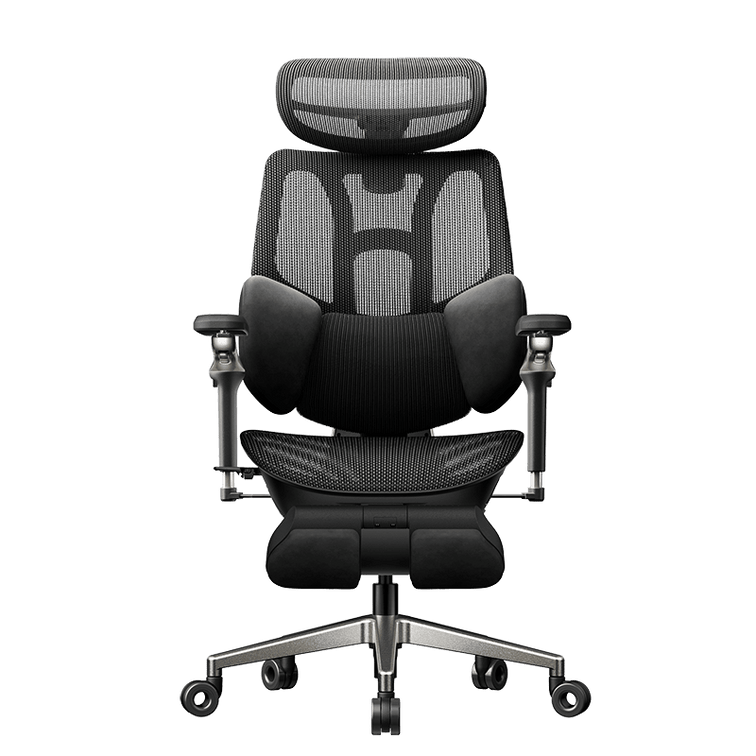
The "Doomscroll" King: E3 Pro’s Adaptive Support
In a recent feature, CNET highlighted the HBADA E3 Pro as a standout solution for those who spend long hours at a desk—whether working, gaming, or "doomscrolling."
"The E3 Pro is designed to adapt to how you sit rather than forcing you into a fixed position all day... The three-zone floating wing lumbar is one of the standout features here." — CNET Deals
The 2026 Edition takes this further with CloudMesh™ upholstery, offering breathability that CNET notes "matters more than you'd think during long sessions."
Why Trust the Experts?
HBADA’s inclusion in CNET’s list isn't just about price. It’s about Tailored Reliability.
Tested for Longevity: Our chairs exceed BIFMA standards with over 120,000 fatigue cycles.
Universal Fit: Engineered to support users from 5'1" to 6'5".
Upgraded Protection: We've listened to user feedback and officially extended our core component warranty to 5 years for the E3 and X7 series.
Conclusion: Upgrade Your Workspace Today
Whether you are looking for the flagship E3 Pro 2026 or a budget-friendly essential, CNET’s endorsement confirms what 10 million HBADA users already know: sincere craftsmanship leads to better health.
[Explore CNET’s Top HBADA Picks]
E3 Air Ergonomic Office Chair 2026 Edition
E3 Pro Ergonomic Office Chair 2026 Edition
Relevent aritcle: https://www.cnet.com/deals/hbada-ergonomic-office-chairs-deals/
Mar 30, 2026
CNET Tested HBADA E3 Pro for 2026: The Chair That Adapts to How You Sit
Contents
E3 Pro's adaptive support
Why trust the experts?
Conclusion
Finding a high-quality office chair shouldn't feel like a luxury reserved for senior executives. This year, the tech experts at CNET have put the industry’s top seating solutions to the test, and HBADA E3 Pro 2026 Edition has emerged as a top recommendation for users who refuse to compromise on spinal health or their budget.
The "Doomscroll" King: E3 Pro’s Adaptive Support
In a recent feature, CNET highlighted the HBADA E3 Pro as a standout solution for those who spend long hours at a desk—whether working, gaming, or "doomscrolling."
"The E3 Pro is designed to adapt to how you sit rather than forcing you into a fixed position all day... The three-zone floating wing lumbar is one of the standout features here." — CNET Deals
The 2026 Edition takes this further with CloudMesh™ upholstery, offering breathability that CNET notes "matters more than you'd think during long sessions."
Why Trust the Experts?
HBADA’s inclusion in CNET’s list isn't just about price. It’s about Tailored Reliability.
Tested for Longevity: Our chairs exceed BIFMA standards with over 120,000 fatigue cycles.
Universal Fit: Engineered to support users from 5'1" to 6'5".
Upgraded Protection: We've listened to user feedback and officially extended our core component warranty to 5 years for the E3 and X7 series.
Conclusion: Upgrade Your Workspace Today
Whether you are looking for the flagship E3 Pro 2026 or a budget-friendly essential, CNET’s endorsement confirms what 10 million HBADA users already know: sincere craftsmanship leads to better health.
[Explore CNET’s Top HBADA Picks]
E3 Air Ergonomic Office Chair 2026 Edition
E3 Pro Ergonomic Office Chair 2026 Edition
Relevent aritcle: https://www.cnet.com/deals/hbada-ergonomic-office-chairs-deals/
Mar 30, 2026
 HBADA E3 Pro: Highlighted in PCGamesN as a Fully Adjustable Ergonomic Chair
Contents
Why the E3 Pro is gaining attention
Key features highlighted in public discussions
Deep adjustability for personalized fit
Ergonomic & breathable mesh structure
Built for gamers, creators, and remote workers
Ergonomic chairs vs. traditional gaming chairs
Read the full PCGamesN article
Consider the HBADA X7 Smart ergonomic chair
As the conversation around long-hours seating evolves, the HBADA E3 Pro Ergonomic Chair continues to draw attention from tech and gaming media for its focus on adjustability, posture support, and hybrid (work + gaming) usability.
Recently, the E3 Pro was the subject of a publicly available review on PCGamesN, a leading source in PC hardware and gaming lifestyle coverage. You can read their full article here:https://www.pcgamesn.com/hbada-e3-pro-ergonomic-chair-review
Note: HBADA does not summarize or restate the publication’s opinions and makes no claim of endorsement, ranking, or partnership. All editorial evaluations belong solely to the respective publication.
Why the E3 Pro Is Gaining Attention in the Gaming & Productivity Space
Across the industry, reviewers and ergonomic specialists have increasingly discussed how gamers and remote workers benefit from chair designs that go beyond traditional racing-style aesthetics. With more users sitting 6–12 hours daily, posture, adjustability, and lower-back health have become essential priorities.
This industry trend provides helpful context for why the HBADA E3 Pro is frequently included in ergonomic-chair discussions.
Key Features of the E3 Pro Highlighted in Public Product Discussions
While each reviewer evaluates chairs independently, several features are commonly recognized in public coverage and customer feedback:
1. Deep Adjustability for Personalized Fit
The E3 Pro includes adjustments often found in higher-end ergonomic models:
3D dynamic lumbar support
Adjustable seat depth
Multi-angle headrest Customizations
6D armrests Adjustments
Adaptive synchro-tilt mechanism
This makes the chair adaptable to a wide range of body shapes, sitting habits, and work/gaming setups.
2. Ergonomic & Breathable Mesh Structure
Unlike racing-style gaming seats, the E3 Pro uses:
A full mesh back and seat for airflow
An open ergonomic frame for natural posture
Design focused on spinal alignment and pressure relief
Public ergonomic studies consistently show that breathable mesh and adjustable lumbar systems reduce fatigue in long work sessions.
3. Built for Gamers, Creators, and Remote Workers
Based on its design characteristics, the E3 Pro is particularly suited for:
PC gamers needing long-session support
Video editors & content creators
Developers & remote professionals
Students, officers and remote-workers
Anyone experiencing lower-back discomfort from long sitting hours
Its versatility makes it a hybrid work/play chair for modern setups.
Ergonomic Chairs vs. Traditional Gaming Chairs — Neutral Overview
Ergonomic Chairs:
Prioritize posture alignment
Use adjustable lumbar and seat-depth controls
Mesh designs that reduce heat & pressure
Built for 6–12 hours of use
Gaming Chairs:
Often use bucket-seat styling
Limited lumbar customization
Typically upholstered rather than mesh
Prioritize visual theme over ergonomic tailoring
These observations come from general market research and ergonomics studies—not from the PCGamesN article.
Read the Full PCGamesN Article
For readers who want to see PCGamesN’s independent analysis, the full review is publicly accessible here:👉 https://www.pcgamesn.com/hbada-e3-pro-ergonomic-chair-review
All opinions expressed in the article belong solely to PCGamesN.
Looking for More Comfort? Consider the HBADA X7 Smart Ergonomic Chair
For gamers or creators who want posture support plus muscle relief, the HBADA X7 Smart Ergonomic Chair adds features designed specifically for long-hour comfort:
Why Gamers May Prefer the X7
Active lumbar tracking that follows your spine as you move
Built-in massage to loosen tight lower-back muscles
Soothing heating therapy for mid-game tension or long editing sessions
Auto-recline with leg rest for rest breaks
Breathable mesh seat with ventilation
8D Dual-Core Bionic Massage – Engineered to Mimic a Real Therapist’s Touch
AI Smart Lumbar Tracking - Adapts to Your Motion, Sustains Support All Day
If your gaming or work sessions stretch late into the night, the X7 offers comfort-enhancing technologies that help reduce muscle stiffness and maintain better posture hour after hour.
Explore the X7 Smart Ergonomic Chair →
Dec 04, 2025
HBADA E3 Pro: Highlighted in PCGamesN as a Fully Adjustable Ergonomic Chair
Contents
Why the E3 Pro is gaining attention
Key features highlighted in public discussions
Deep adjustability for personalized fit
Ergonomic & breathable mesh structure
Built for gamers, creators, and remote workers
Ergonomic chairs vs. traditional gaming chairs
Read the full PCGamesN article
Consider the HBADA X7 Smart ergonomic chair
As the conversation around long-hours seating evolves, the HBADA E3 Pro Ergonomic Chair continues to draw attention from tech and gaming media for its focus on adjustability, posture support, and hybrid (work + gaming) usability.
Recently, the E3 Pro was the subject of a publicly available review on PCGamesN, a leading source in PC hardware and gaming lifestyle coverage. You can read their full article here:https://www.pcgamesn.com/hbada-e3-pro-ergonomic-chair-review
Note: HBADA does not summarize or restate the publication’s opinions and makes no claim of endorsement, ranking, or partnership. All editorial evaluations belong solely to the respective publication.
Why the E3 Pro Is Gaining Attention in the Gaming & Productivity Space
Across the industry, reviewers and ergonomic specialists have increasingly discussed how gamers and remote workers benefit from chair designs that go beyond traditional racing-style aesthetics. With more users sitting 6–12 hours daily, posture, adjustability, and lower-back health have become essential priorities.
This industry trend provides helpful context for why the HBADA E3 Pro is frequently included in ergonomic-chair discussions.
Key Features of the E3 Pro Highlighted in Public Product Discussions
While each reviewer evaluates chairs independently, several features are commonly recognized in public coverage and customer feedback:
1. Deep Adjustability for Personalized Fit
The E3 Pro includes adjustments often found in higher-end ergonomic models:
3D dynamic lumbar support
Adjustable seat depth
Multi-angle headrest Customizations
6D armrests Adjustments
Adaptive synchro-tilt mechanism
This makes the chair adaptable to a wide range of body shapes, sitting habits, and work/gaming setups.
2. Ergonomic & Breathable Mesh Structure
Unlike racing-style gaming seats, the E3 Pro uses:
A full mesh back and seat for airflow
An open ergonomic frame for natural posture
Design focused on spinal alignment and pressure relief
Public ergonomic studies consistently show that breathable mesh and adjustable lumbar systems reduce fatigue in long work sessions.
3. Built for Gamers, Creators, and Remote Workers
Based on its design characteristics, the E3 Pro is particularly suited for:
PC gamers needing long-session support
Video editors & content creators
Developers & remote professionals
Students, officers and remote-workers
Anyone experiencing lower-back discomfort from long sitting hours
Its versatility makes it a hybrid work/play chair for modern setups.
Ergonomic Chairs vs. Traditional Gaming Chairs — Neutral Overview
Ergonomic Chairs:
Prioritize posture alignment
Use adjustable lumbar and seat-depth controls
Mesh designs that reduce heat & pressure
Built for 6–12 hours of use
Gaming Chairs:
Often use bucket-seat styling
Limited lumbar customization
Typically upholstered rather than mesh
Prioritize visual theme over ergonomic tailoring
These observations come from general market research and ergonomics studies—not from the PCGamesN article.
Read the Full PCGamesN Article
For readers who want to see PCGamesN’s independent analysis, the full review is publicly accessible here:👉 https://www.pcgamesn.com/hbada-e3-pro-ergonomic-chair-review
All opinions expressed in the article belong solely to PCGamesN.
Looking for More Comfort? Consider the HBADA X7 Smart Ergonomic Chair
For gamers or creators who want posture support plus muscle relief, the HBADA X7 Smart Ergonomic Chair adds features designed specifically for long-hour comfort:
Why Gamers May Prefer the X7
Active lumbar tracking that follows your spine as you move
Built-in massage to loosen tight lower-back muscles
Soothing heating therapy for mid-game tension or long editing sessions
Auto-recline with leg rest for rest breaks
Breathable mesh seat with ventilation
8D Dual-Core Bionic Massage – Engineered to Mimic a Real Therapist’s Touch
AI Smart Lumbar Tracking - Adapts to Your Motion, Sustains Support All Day
If your gaming or work sessions stretch late into the night, the X7 offers comfort-enhancing technologies that help reduce muscle stiffness and maintain better posture hour after hour.
Explore the X7 Smart Ergonomic Chair →
Dec 04, 2025
 Holiday Gifting Guide for Gamers (2026): Ergonomic Chairs They’ll Actually Use
Contents
Why gamers need real ergonomic support
Top HBADA chairs gamers love
P2 — best entry-level ergonomic chair for gamers
E3 Air — best-value fully adjustable gaming chair
Why ergonomic chairs make the best gaming gift
Black Friday savings — top deals to check out
Gift better. Sit better. Game better.
Why Gamers Need Real Ergonomic Support (Not Just RGB Lights)
Whether they’re grinding ranked, streaming for hours, or juggling work and gaming, the average gamer spends 6–10 hours a day sitting. And while many “gaming chairs” focus on flashy colors, very few actually support the back, neck, and posture during long play sessions.
That’s where ergonomic gaming chairs—real ergonomic chairs—make all the difference.
This holiday season, if you’re searching for a gaming gift they’ll actually use, nothing beats a chair that keeps them comfortable, aligned, and focused.
And the timing couldn’t be better:
HBADA Black Friday Sale is officially live — up to 53% off.
Let’s break down the top HBADA chairs perfect for gamers.
Top HBADA Chairs Gamers Love
1. HBADA P2 Ergonomic Chair — The Best Entry-Level Ergonomic Chair for Gamers
Perfect for:
Teen gamers
College students
Budget-conscious gift givers
Small desk setups or bedroom gaming corners
Why it makes an amazing gaming gift:
True ergonomic back design (way better than typical gaming chairs)
Dynamic lumbar support that adjusts during movement
Breathable mesh to keep players cool
Lightweight and easy to assemble
Affordable price — especially during Black Friday
Gamers who play for hours will immediately feel the difference — better posture, better airflow, and far fewer aches after long sessions.
2. HBADA E3 Air Ergonomic Chair — Best-Value Fully Adjustable Gaming Chair
Perfect for:
Serious gamers
Streamers
PC gamers who play long, intense sessions
People who want an ergonomic upgrade from traditional gaming chairs
Why gamers love it:
3D adjustable lumbar support for perfect lower-back alignment
6D armrests (critical for controller + mouse/keyboard switches)
High-resilience mesh that stays breathable
Recline + lock system for mid-game breaks
A futuristic, refined design that fits any gamer’s setup
If the gamer in your life struggles with back pain or fidgets constantly, this is the chair that keeps them comfortable and in the zone.
Why Ergonomic Chairs Make the Best Gaming Gift
Unlike gadgets that get outdated fast, a high-quality ergonomic chair becomes part of a gamer’s daily comfort, health, and performance.
An ergonomic chair helps:
Reduce lower-back pain
Improve posture
Prevent shoulder strain
Support better focus and reaction time
Keep the body cool during long sessions
And because gamers use their chairs every single day, it’s a gift that has real, lasting value.
🎁 Make It the Best Holiday Gift — With Black Friday Savings
This year’s HBADA Black Friday Sale is offering the biggest savings of 2025 on gaming-friendly chairs.
Top Deals to Check Out
P2 Ergonomic Chair — Only $215 (Limited-Time Black Friday Deal)
E3 Air Ergonomic Chair — Save $217 and get the Best-value fully-adjustable ergonomic chair
With prices this low, many parents and partners pick up a second chair for their own home office.
Gift Better. Sit Better. Game Better.
If you’re shopping for:
✔ Your gamer partner✔ Your teen or college student✔ A friend who streams✔ Yourself (no shame!)
An ergonomic gaming chair is one of the most practical, meaningful gifts you can give this holiday season.
Shop Gaming-Friendly Chairs (Black Friday Sale Now Live!)
Nov 25, 2025
Holiday Gifting Guide for Gamers (2026): Ergonomic Chairs They’ll Actually Use
Contents
Why gamers need real ergonomic support
Top HBADA chairs gamers love
P2 — best entry-level ergonomic chair for gamers
E3 Air — best-value fully adjustable gaming chair
Why ergonomic chairs make the best gaming gift
Black Friday savings — top deals to check out
Gift better. Sit better. Game better.
Why Gamers Need Real Ergonomic Support (Not Just RGB Lights)
Whether they’re grinding ranked, streaming for hours, or juggling work and gaming, the average gamer spends 6–10 hours a day sitting. And while many “gaming chairs” focus on flashy colors, very few actually support the back, neck, and posture during long play sessions.
That’s where ergonomic gaming chairs—real ergonomic chairs—make all the difference.
This holiday season, if you’re searching for a gaming gift they’ll actually use, nothing beats a chair that keeps them comfortable, aligned, and focused.
And the timing couldn’t be better:
HBADA Black Friday Sale is officially live — up to 53% off.
Let’s break down the top HBADA chairs perfect for gamers.
Top HBADA Chairs Gamers Love
1. HBADA P2 Ergonomic Chair — The Best Entry-Level Ergonomic Chair for Gamers
Perfect for:
Teen gamers
College students
Budget-conscious gift givers
Small desk setups or bedroom gaming corners
Why it makes an amazing gaming gift:
True ergonomic back design (way better than typical gaming chairs)
Dynamic lumbar support that adjusts during movement
Breathable mesh to keep players cool
Lightweight and easy to assemble
Affordable price — especially during Black Friday
Gamers who play for hours will immediately feel the difference — better posture, better airflow, and far fewer aches after long sessions.
2. HBADA E3 Air Ergonomic Chair — Best-Value Fully Adjustable Gaming Chair
Perfect for:
Serious gamers
Streamers
PC gamers who play long, intense sessions
People who want an ergonomic upgrade from traditional gaming chairs
Why gamers love it:
3D adjustable lumbar support for perfect lower-back alignment
6D armrests (critical for controller + mouse/keyboard switches)
High-resilience mesh that stays breathable
Recline + lock system for mid-game breaks
A futuristic, refined design that fits any gamer’s setup
If the gamer in your life struggles with back pain or fidgets constantly, this is the chair that keeps them comfortable and in the zone.
Why Ergonomic Chairs Make the Best Gaming Gift
Unlike gadgets that get outdated fast, a high-quality ergonomic chair becomes part of a gamer’s daily comfort, health, and performance.
An ergonomic chair helps:
Reduce lower-back pain
Improve posture
Prevent shoulder strain
Support better focus and reaction time
Keep the body cool during long sessions
And because gamers use their chairs every single day, it’s a gift that has real, lasting value.
🎁 Make It the Best Holiday Gift — With Black Friday Savings
This year’s HBADA Black Friday Sale is offering the biggest savings of 2025 on gaming-friendly chairs.
Top Deals to Check Out
P2 Ergonomic Chair — Only $215 (Limited-Time Black Friday Deal)
E3 Air Ergonomic Chair — Save $217 and get the Best-value fully-adjustable ergonomic chair
With prices this low, many parents and partners pick up a second chair for their own home office.
Gift Better. Sit Better. Game Better.
If you’re shopping for:
✔ Your gamer partner✔ Your teen or college student✔ A friend who streams✔ Yourself (no shame!)
An ergonomic gaming chair is one of the most practical, meaningful gifts you can give this holiday season.
Shop Gaming-Friendly Chairs (Black Friday Sale Now Live!)
Nov 25, 2025
 Why an Ergonomic Chair Is the Best Gift for Anyone with Back Pain
Contents
Why an ergonomic chair makes the most thoughtful gift
How back pain happens — and why your gift can fix it
Why the HBADA X7 makes the best gift
Smart massage & heating for daily pain relief
Self-adapting lumbar tracking
Ergonomic support for any body shape
The gift that actually improves someone's life
How to choose the right ergonomic chair as a gift
Why it's the perfect holiday gift
Ready to give the gift of comfort?
Why an Ergonomic Chair Makes the Most Thoughtful Gift
If you’re searching for a gift that’s practical, impactful, and genuinely life-changing, nothing beats an ergonomic chair—especially for anyone who struggles with lower back pain, long work hours, or poor posture.
Unlike typical holiday gifts, an ergonomic chair offers something far more valuable:
✔daily relief✔ better posture✔ more energy✔ less pain during work or study
That's why people often say: “The best gifts are the ones you use every day.”
How Back Pain Happens (and Why Your Gift Can Fix It)
Most lower back pain comes from:
sitting in unsupported chairs
poor spinal alignment
lack of lumbar contact
muscle fatigue from long work sessions
An ergonomic chair addresses all of these issues at once by supporting the spine’s natural S-curve and reducing pressure on the lower back.
Why the HBADA X7 Smart Ergonomic Chair Makes the Best Gift
The X7 is engineered specifically for pain relief and long-hour comfort—making it the perfect gift for someone with chronic back tension or a demanding desk setup.
1. Smart Massage &Heating for Daily Pain Relief
The X7 provides built-in lumbar massage and gentle heating to relax tight muscles and boost circulation—ideal for people who sit for hours.
This feature alone makes it an incredible gift because it provides:
muscle relaxation
stress reduction
comfort during long work sessions
soothing heat during winter
2. Self-Adapting Lumbar Tracking
The X7 automatically adjusts its lumbar support as you move—something no standard chair can do.
This ensures:
proper posture at every angle
no slouching or collapsing
consistent spinal support
reduced long-term back strain
3. Ergonomic Support for Any Body Shape
With its 6D armrests, automatic recline, breathable mesh, and full adjustability, the X7 works for a wide range of users—from students to professionals to gamers.
4. The Gift That Actually Improves Someone’s Life
Instead of guessing sizes, colors, or tastes…You’re giving comfort, health, and real relief.
For anyone with back pain, this isn’t a chair—it's a life upgrade.
How to Choose the Right Ergonomic Chair as a Gift
When shopping for someone who deals with back pain, look for:
✔ Dynamic or auto-adjusting lumbar support
Keeps the spine aligned without effort.
✔ Massage and heating functions
Accelerates relaxation and reduces daily soreness.
✔ Recline + leg rest
Relieves pressure from the lower spine.
✔ Breathable, supportive mesh
Prevents sinking and keeps posture stable.
✔ Adjustable armrests and headrest
Ensures a customized fit for any body shape.
The X7 checks all of these boxes—making it one of the most effective and thoughtful gifts you can give.
Why It's the Perfect Holiday Gift
Ergonomic chairs are becoming one of the top gifting trends because more people than ever are working or studying at home.
Your gift can:
⭐help prevent long-term back issues
⭐improve someone’s daily comfort
⭐support productivity
⭐boost their overall well-being
⭐It feels personal, premium, and meaningful—exactly what a great gift should be.
Ready to Give the Gift of Comfort?
Explore the full features of the HBADA X7 Smart Ergonomic Chair:[Shop the X7 Smart Chair →]
For more expert insights on whether an HBADA chair is good for back pain relief, check here:
Q: What is the best chair after spinal surgery?
A firm, high-back chair with stable lumbar support and high armrests to help you stand up. The HBADA E3 Ultra is a top recovery choice in 2026 due to its stable, non-slump design.
Q: What can you never do after spinal surgery?
The "BLT": Bending, Lifting, or Twisting. An HBADA swivel chair allows you to turn your whole body without twisting your spine.
Q: What not to do with L4 L5 disc bulge?
Avoid soft couches and prolonged static sitting. Use an HBADA chair with a forward-tilt seat to keep the pelvis neutral and reduce disc protrusion.
Q: What is the hardest back surgery to recover from?
Multi-level Spinal Fusion. Recovery requires 2026-level ergonomic support from brands like HBADA to ensure the graft sets correctly.
Q: What movements make spinal stenosis worse?
Extension (leaning back too far) and standing for long periods. A slightly flexed (forward-leaning) sitting position in an HBADA chair often provides relief.
Q: Is it better to sleep in a recliner or a bed after back surgery?
In the first 48 hours, a recliner (or an HBADA chair with 150° recline) is often easier for getting in and out of without twisting.
Q: How long are you bedridden after spinal surgery?
Usually only 1–2 days. 2026 medical advice suggests early mobilization, using a supportive HBADA chair for short sitting intervals.
Q: What chairs are good for arthritis?
Chairs with easy-to-reach controls and pressure-relief mesh. HBADA chairs use high-elasticity mesh that prevents "pressure hotspots" on arthritic joints.
Q: What should arthritis sufferers avoid?
Static positions and "claw-like" adjustment levers. HBADA uses light-touch paddle controls that are easy on arthritic fingers.
Q: What calms arthritis?
Gentle movement (active sitting) and heat. The breathable mesh on HBADA chairs keeps joints at a stable temperature, avoiding the stiffness caused by cold.
Q: What triggers osteoarthritis flare-ups?
Cold weather, overexertion, and sitting in one position too long. HBADA's dynamic backrest encourages micro-movements to keep joints lubricated.
Q: Does arthritis hurt more when sitting?
Yes, if the chair is hard or immobile. An HBADA chair distributes weight evenly, reducing the load on the hips and knees.
Q: Is sitting bad for arthritic knees?
Only if the chair is too low. HBADA's gas lift allows you to sit high enough that your knees are slightly below your hips, reducing knee stress.
Q: What chair is good for spinal stenosis?
A chair that supports a slightly "hunched" or flexed posture. HBADA's adjustable backrest tension allows you to lean forward slightly while still being supported.
Q: Is spinal stenosis worse with sitting or standing?
Worse with standing (extension). Sitting (flexion) usually widens the spinal canal and relieves pain. This is why HBADA chairs are essential for stenosis sufferers who need to work.
Q: Can sitting too long aggravate spinal stenosis?
Yes, if the posture is static. HBADA's 2026 "Dynamic Seating" tech ensures you are moving even while sitting.
Q: Does walking help or hurt spinal stenosis?
Short walks help circulation, but long walks can hurt. Chiropractors recommend a "sit-stand-walk" cycle using an HBADA setup.
Q: What is the best sleeping position for someone with spinal stenosis?
On your side in a fetal position with a pillow between your knees.
Q: What position should you avoid with spinal stenosis?
Avoid lying flat on your back or stomach, which arches the spine and narrows the canal.
Q: What is the life expectancy of someone with spinal stenosis?
It is a normal life expectancy. It is a condition of mobility, not mortality. HBADA helps maintain that mobility quality.
Nov 23, 2025
Why an Ergonomic Chair Is the Best Gift for Anyone with Back Pain
Contents
Why an ergonomic chair makes the most thoughtful gift
How back pain happens — and why your gift can fix it
Why the HBADA X7 makes the best gift
Smart massage & heating for daily pain relief
Self-adapting lumbar tracking
Ergonomic support for any body shape
The gift that actually improves someone's life
How to choose the right ergonomic chair as a gift
Why it's the perfect holiday gift
Ready to give the gift of comfort?
Why an Ergonomic Chair Makes the Most Thoughtful Gift
If you’re searching for a gift that’s practical, impactful, and genuinely life-changing, nothing beats an ergonomic chair—especially for anyone who struggles with lower back pain, long work hours, or poor posture.
Unlike typical holiday gifts, an ergonomic chair offers something far more valuable:
✔daily relief✔ better posture✔ more energy✔ less pain during work or study
That's why people often say: “The best gifts are the ones you use every day.”
How Back Pain Happens (and Why Your Gift Can Fix It)
Most lower back pain comes from:
sitting in unsupported chairs
poor spinal alignment
lack of lumbar contact
muscle fatigue from long work sessions
An ergonomic chair addresses all of these issues at once by supporting the spine’s natural S-curve and reducing pressure on the lower back.
Why the HBADA X7 Smart Ergonomic Chair Makes the Best Gift
The X7 is engineered specifically for pain relief and long-hour comfort—making it the perfect gift for someone with chronic back tension or a demanding desk setup.
1. Smart Massage &Heating for Daily Pain Relief
The X7 provides built-in lumbar massage and gentle heating to relax tight muscles and boost circulation—ideal for people who sit for hours.
This feature alone makes it an incredible gift because it provides:
muscle relaxation
stress reduction
comfort during long work sessions
soothing heat during winter
2. Self-Adapting Lumbar Tracking
The X7 automatically adjusts its lumbar support as you move—something no standard chair can do.
This ensures:
proper posture at every angle
no slouching or collapsing
consistent spinal support
reduced long-term back strain
3. Ergonomic Support for Any Body Shape
With its 6D armrests, automatic recline, breathable mesh, and full adjustability, the X7 works for a wide range of users—from students to professionals to gamers.
4. The Gift That Actually Improves Someone’s Life
Instead of guessing sizes, colors, or tastes…You’re giving comfort, health, and real relief.
For anyone with back pain, this isn’t a chair—it's a life upgrade.
How to Choose the Right Ergonomic Chair as a Gift
When shopping for someone who deals with back pain, look for:
✔ Dynamic or auto-adjusting lumbar support
Keeps the spine aligned without effort.
✔ Massage and heating functions
Accelerates relaxation and reduces daily soreness.
✔ Recline + leg rest
Relieves pressure from the lower spine.
✔ Breathable, supportive mesh
Prevents sinking and keeps posture stable.
✔ Adjustable armrests and headrest
Ensures a customized fit for any body shape.
The X7 checks all of these boxes—making it one of the most effective and thoughtful gifts you can give.
Why It's the Perfect Holiday Gift
Ergonomic chairs are becoming one of the top gifting trends because more people than ever are working or studying at home.
Your gift can:
⭐help prevent long-term back issues
⭐improve someone’s daily comfort
⭐support productivity
⭐boost their overall well-being
⭐It feels personal, premium, and meaningful—exactly what a great gift should be.
Ready to Give the Gift of Comfort?
Explore the full features of the HBADA X7 Smart Ergonomic Chair:[Shop the X7 Smart Chair →]
For more expert insights on whether an HBADA chair is good for back pain relief, check here:
Q: What is the best chair after spinal surgery?
A firm, high-back chair with stable lumbar support and high armrests to help you stand up. The HBADA E3 Ultra is a top recovery choice in 2026 due to its stable, non-slump design.
Q: What can you never do after spinal surgery?
The "BLT": Bending, Lifting, or Twisting. An HBADA swivel chair allows you to turn your whole body without twisting your spine.
Q: What not to do with L4 L5 disc bulge?
Avoid soft couches and prolonged static sitting. Use an HBADA chair with a forward-tilt seat to keep the pelvis neutral and reduce disc protrusion.
Q: What is the hardest back surgery to recover from?
Multi-level Spinal Fusion. Recovery requires 2026-level ergonomic support from brands like HBADA to ensure the graft sets correctly.
Q: What movements make spinal stenosis worse?
Extension (leaning back too far) and standing for long periods. A slightly flexed (forward-leaning) sitting position in an HBADA chair often provides relief.
Q: Is it better to sleep in a recliner or a bed after back surgery?
In the first 48 hours, a recliner (or an HBADA chair with 150° recline) is often easier for getting in and out of without twisting.
Q: How long are you bedridden after spinal surgery?
Usually only 1–2 days. 2026 medical advice suggests early mobilization, using a supportive HBADA chair for short sitting intervals.
Q: What chairs are good for arthritis?
Chairs with easy-to-reach controls and pressure-relief mesh. HBADA chairs use high-elasticity mesh that prevents "pressure hotspots" on arthritic joints.
Q: What should arthritis sufferers avoid?
Static positions and "claw-like" adjustment levers. HBADA uses light-touch paddle controls that are easy on arthritic fingers.
Q: What calms arthritis?
Gentle movement (active sitting) and heat. The breathable mesh on HBADA chairs keeps joints at a stable temperature, avoiding the stiffness caused by cold.
Q: What triggers osteoarthritis flare-ups?
Cold weather, overexertion, and sitting in one position too long. HBADA's dynamic backrest encourages micro-movements to keep joints lubricated.
Q: Does arthritis hurt more when sitting?
Yes, if the chair is hard or immobile. An HBADA chair distributes weight evenly, reducing the load on the hips and knees.
Q: Is sitting bad for arthritic knees?
Only if the chair is too low. HBADA's gas lift allows you to sit high enough that your knees are slightly below your hips, reducing knee stress.
Q: What chair is good for spinal stenosis?
A chair that supports a slightly "hunched" or flexed posture. HBADA's adjustable backrest tension allows you to lean forward slightly while still being supported.
Q: Is spinal stenosis worse with sitting or standing?
Worse with standing (extension). Sitting (flexion) usually widens the spinal canal and relieves pain. This is why HBADA chairs are essential for stenosis sufferers who need to work.
Q: Can sitting too long aggravate spinal stenosis?
Yes, if the posture is static. HBADA's 2026 "Dynamic Seating" tech ensures you are moving even while sitting.
Q: Does walking help or hurt spinal stenosis?
Short walks help circulation, but long walks can hurt. Chiropractors recommend a "sit-stand-walk" cycle using an HBADA setup.
Q: What is the best sleeping position for someone with spinal stenosis?
On your side in a fetal position with a pillow between your knees.
Q: What position should you avoid with spinal stenosis?
Avoid lying flat on your back or stomach, which arches the spine and narrows the canal.
Q: What is the life expectancy of someone with spinal stenosis?
It is a normal life expectancy. It is a condition of mobility, not mortality. HBADA helps maintain that mobility quality.
Nov 23, 2025
 HBADA Lumbar Support Guide: The Science of Sitting Right
Updated July 2026
Correct lumbar support should contact the natural inward curve of your lower back, usually slightly above the belt line. Start with gentle support, sit fully against the backrest and adjust the height, depth or resistance until you feel broad, comfortable contact without being pushed forward.
A well-adjusted lumbar-support system can help an ergonomic office chair fit your body and working position more effectively. However, maximum pressure is not automatically the best setting. The goal is comfortable support that allows you to change position naturally throughout the day.
Quick adjustment: Set the seat height and depth first. Sit fully back, place your feet flat, position the lumbar support in the curve of your lower back and begin with a low or moderate intensity. Increase it gradually only if you need more contact.
Contents
What is lumbar support?
Where should lumbar support be positioned?
How to adjust lumbar support step by step
Adjusting lumbar height, depth and resistance
Signs your lumbar support is too high or too low
Dynamic vs. fixed lumbar support
HBADA lumbar-support systems
Lumbar-support calibration checklist
Frequently asked questions
What Is Lumbar Support?
Lumbar support is the part of an office-chair backrest designed to contact the lower-back region. It helps the backrest follow the natural inward curve of the lumbar spine while the user is seated.
According to the U.S. Occupational Safety and Health Administration, a chair backrest should conform to the natural curvature of the spine and provide adequate lumbar support. OSHA also recommends that lumbar support be height adjustable so it can be positioned to fit the lower back.
Depending on the chair, lumbar support may include:
Height adjustment: changes where the support contacts the lower back.
Depth adjustment: controls how far the support projects toward the user.
Resistance or tension adjustment: changes how firmly the support responds.
Flexible support zones: distribute contact across the center and sides of the lower back.
Automatic lumbar tracking: responds to posture or pressure changes without requiring repeated manual adjustment.
The lumbar system cannot be adjusted in isolation. Seat height, seat depth, backrest recline, armrest position and desk height all influence how the user contacts the backrest.
Compare the adjustment ranges and support systems available across the HBADA ergonomic office chair collection.
Where Should Lumbar Support Be Positioned?
Lumbar support should normally contact the natural inward curve of the lower back, around the area slightly above the top of the pelvis or belt line. It should not press directly against the tailbone, and it should not sit so high that it pushes into the middle of the back or lower ribs.
The correct position varies because people have different heights, torso lengths and spinal curves. Instead of relying on one fixed measurement, use the following test:
Sit fully against the backrest.
Relax your shoulders.
Place your feet securely on the floor or an appropriate footrest.
Locate the natural inward curve above the top of your pelvis.
Align the center of the lumbar support with that area.
Check that the contact feels broad rather than concentrated in one small point.
If the lumbar component pushes only one spot or forces you away from the backrest, reduce its depth or adjust its position.
How to Adjust Lumbar Support Step by Step
Step 1: Set the seat height
Adjust the chair so your feet rest securely on the floor and your knees remain around hip level or slightly below it. If your feet cannot reach the floor after the chair has been matched to the desk, use an appropriate footrest.
Do not calibrate the lumbar support before setting the seat height. Changing the height later can change the point where your lower back meets the backrest.
Step 2: Adjust the seat depth
Sit fully against the backrest. The seat should support your thighs without pressing firmly behind the knees.
If the seat is too deep, you may slide forward and lose contact with the lumbar support. If it is too shallow, the seat may not provide adequate thigh support.
Step 3: Choose a neutral working recline
Begin with the backrest upright or slightly reclined in a position that allows you to work without reaching toward the keyboard or monitor.
OSHA recommends that the back be fully supported with suitable lumbar support when sitting upright or leaning back slightly. The backrest should provide enough resistance to remain supportive while still allowing appropriate movement.
Step 4: Position the lumbar support
Raise or lower the lumbar component until it fills the inward curve of the lower back. Make small adjustments and test each position instead of moving directly from the minimum to the maximum setting.
Step 5: Start with gentle depth or resistance
Begin with a low or moderate support setting. Increase the depth or resistance gradually until the lumbar component remains in contact with your lower back.
The support should not force you to arch your back or push your pelvis toward the front edge of the seat.
Step 6: Test the setting for 10 to 15 minutes
Use the chair while typing, reading and leaning back slightly. Check whether the support continues to feel comfortable as you make small posture changes.
Ask yourself:
Can I remain fully against the backrest?
Does the support stay in contact with my lower back?
Is pressure distributed across a broad area?
Am I being pushed toward the front of the seat?
Can I reach the keyboard without leaning forward?
Can I change position without losing all back support?
If the lumbar support becomes distracting or uncomfortable, reduce its intensity or change its height slightly.
Adjusting Lumbar Height, Depth and Resistance
Adjustment
What It Controls
Recommended Starting Point
Common Mistake
Height
The vertical contact position
The natural inward curve above the pelvis
Placing the support directly against the tailbone or too high on the back
Depth
How far the support projects toward the user
Gentle, broad contact that fills the lower-back curve
Assuming the maximum depth provides the best support
Resistance
How firmly the component responds when you lean against it
Enough resistance to maintain contact during small movements
Using a setting that prevents natural posture changes
Backrest recline
Your torso angle and pressure against the backrest
A stable working position that keeps you close to the desk
Reclining while reaching forward for the keyboard
Seat depth
Thigh support and distance from the backrest
Enough room to sit fully back without pressure behind the knees
Using a seat so deep that the user must slide forward
Signs Your Lumbar Support Is Too High or Too Low
Signs the support may be too high
Pressure is concentrated around the middle of your back.
The component touches the lower ribs rather than the lower-back curve.
The area immediately above the pelvis still feels unsupported.
You feel encouraged to slide forward in the seat.
Signs the support may be too low
The support presses against the tailbone or the top edge of the pelvis.
There is still a noticeable gap higher in the lower back.
Pressure feels concentrated close to the seat surface.
You cannot sit fully against the backrest comfortably.
Signs the lumbar support may be too strong
Your pelvis is pushed toward the front of the chair.
You feel a hard or concentrated pressure point.
Your lower back is being forced into an exaggerated curve.
You round your shoulders to compensate for the pressure.
You avoid using the backrest.
More pressure does not automatically mean better ergonomic support. If the chair pushes you forward, reduce the lumbar depth or resistance and recheck the seat-depth setting.
Dynamic vs. Fixed Lumbar Support: What Is the Difference?
The choice between dynamic and fixed lumbar support depends on how you sit, how frequently you change position and how much manual adjustment you prefer.
Support Type
How It Works
Potential Advantage
What to Check
Fixed lumbar support
Maintains a stable position and firmness
Simple and consistent support
Whether its fixed position matches your lower-back curve
Manually adjustable support
Allows the user to adjust height, depth or tension
Can be calibrated to different body dimensions
Whether the adjustment range is sufficient
Dynamic support
Flexes or moves as the user changes position
May maintain contact across different seated postures
Whether the movement feels supportive rather than intrusive
Powered lumbar tracking
Uses powered components to respond to posture or pressure changes
Reduces repeated manual adjustment
Initial chair fit, intensity settings and power requirements
Fixed support may suit users who prefer a consistent feel. Dynamic or powered systems may suit users who move frequently between focused work and reclining.
Neither system is automatically correct for every person. Chair dimensions and the available adjustment range remain essential.
HBADA Chairs with Adjustable Lumbar-Support Systems
HBADA E3 Pro Ergonomic Office Chair
The HBADA E3 Pro uses a three-zone elastic lumbar-support design. The central zone supports the area around the spine, while flexible side sections are designed to maintain broader lower-back contact as the user moves.
Recommended E3 Pro setup order:
Adjust the seat height.
Set the seat depth so you can sit fully against the backrest.
Position the lumbar system in the natural lower-back curve.
Begin with moderate lumbar contact.
Adjust recline resistance.
Test the setting while working and while slightly reclined.
If the lumbar support pushes you away from the backrest, reduce its intensity or recheck the seat depth.
HBADA X7 Smart Ergonomic Office Chair
The HBADA X7 Smart Ergonomic Office Chair uses powered lumbar tracking designed to respond to changes in posture and pressure.
Automatic tracking reduces the need to rely on one fixed manual setting, but the chair still needs an appropriate initial setup:
Set the correct seat height.
Adjust the seat depth for suitable thigh support.
Sit fully against the backrest.
Begin with a lower lumbar intensity.
Increase the intensity only if you need more contact.
Test the system in upright and reclined positions.
Powered tracking should follow your position without forcing your lower back into a rigid shape.
How to choose between the E3 Pro and X7
Choose the E3 Pro if you prefer a mechanically adaptive, three-zone lumbar system with extensive manual chair adjustments.
Choose the X7 if you prefer powered lumbar tracking and smart comfort functions.
Exact features, configurations and controls may vary. Review the current product page and the manual supplied with the chair before adjusting it.
Lumbar-Support Calibration Checklist
My feet are supported by the floor or a footrest.
My thighs rest comfortably on the seat.
I can sit fully against the backrest.
The lumbar support contacts the inward curve of my lower back.
The support does not press directly against my tailbone.
The support does not push me toward the front edge of the seat.
I do not feel one concentrated pressure point.
My shoulders remain relaxed.
I can reach the keyboard without leaning forward.
I can make small posture changes while remaining supported.
If several items are not true, adjust the complete chair rather than increasing only the lumbar-support setting.
NIOSH advises computer users to avoid sitting or standing for too long and notes that short breaks can help reduce discomfort. Even the best office chair for 2026 cannot replace regular movement and a properly arranged workstation.
Conclusion: Support Should Fit You
Correct lumbar-support calibration begins with the whole chair. Set the seat height and depth first, position the lumbar component in the natural lower-back curve and use only enough depth or resistance to maintain comfortable contact.
The best lumbar support is not the strongest one. It is the setting that helps you remain against the backrest, keeps pressure broadly distributed and allows natural changes in position.
Compare seat dimensions, lumbar-support designs and adjustment ranges on the HBADA ergonomic chair comparison page.
Frequently Asked Questions About Lumbar Support
Where should lumbar support sit on an office chair?
Lumbar support should normally sit in the natural inward curve of the lower back, slightly above the top of the pelvis or belt line. It should not press directly against the tailbone or sit high against the lower ribs.
How do you adjust office-chair lumbar support?
Set the seat height and depth first. Sit fully against the backrest, position the lumbar support in your lower-back curve and start with gentle depth or resistance. Increase the setting gradually only if more contact is needed.
Should lumbar support feel firm?
Lumbar support should feel present but not excessively firm. A suitable setting creates broad contact without pushing the user forward or creating a hard pressure point.
Can lumbar support be too high?
Yes. Lumbar support may be too high if it presses into the middle of the back or lower ribs while leaving the area above the pelvis unsupported.
Can lumbar support be too low?
Yes. It may be too low if it presses against the tailbone or top of the pelvis rather than filling the natural inward curve of the lower back.
Can lumbar support be too strong?
Yes. Excessive depth or resistance may push the pelvis forward, exaggerate the lower-back curve or make the user avoid the backrest. Reduce the intensity if the support feels intrusive.
Should lumbar support push your back forward?
No. It should fill the gap behind the lower back without forcing the torso or pelvis toward the front of the seat.
What is dynamic lumbar support?
Dynamic lumbar support flexes or moves as the user changes position. It is designed to maintain contact across a range of sitting postures rather than remaining completely static.
What is automatic lumbar tracking?
Automatic lumbar tracking uses powered components to respond to posture or pressure changes. It can reduce repeated manual adjustment, although the chair still needs to be fitted correctly to the user.
Is lumbar support necessary for everyone?
Many users benefit from a backrest that follows the natural lower-back curve, but the preferred amount of support varies. The chair should fit the user and allow a comfortable, stable position without forcing one rigid posture.
Can an ergonomic chair treat chronic back pain?
No office chair should be presented as a treatment for chronic back pain. A correctly adjusted ergonomic chair may support a more comfortable sitting position, but it cannot diagnose, prevent or cure a medical condition. Consult a qualified healthcare professional about persistent pain, numbness, weakness or other concerning symptoms.
Which HBADA chair has automatic lumbar support?
The HBADA X7 uses powered lumbar tracking designed to respond to posture changes. The E3 Pro uses a mechanically adaptive three-zone elastic lumbar-support system.
How often should you change your lumbar-support setting?
Recheck the setting when a different person uses the chair, when the seat depth or height changes, or when moving between substantially different working and reclining positions.
Sources
OSHA: Computer Workstations—Chair Components
OSHA: Neutral Computer Workstation Positions
CDC/NIOSH: Office Environments and Worker Safety
This guide provides general information about workstation adjustment and is not medical advice. HBADA chairs are not medical devices. Product functions, configurations, availability and specifications may change; confirm current details on the relevant product page and user manual.
Nov 13, 2025
HBADA Lumbar Support Guide: The Science of Sitting Right
Updated July 2026
Correct lumbar support should contact the natural inward curve of your lower back, usually slightly above the belt line. Start with gentle support, sit fully against the backrest and adjust the height, depth or resistance until you feel broad, comfortable contact without being pushed forward.
A well-adjusted lumbar-support system can help an ergonomic office chair fit your body and working position more effectively. However, maximum pressure is not automatically the best setting. The goal is comfortable support that allows you to change position naturally throughout the day.
Quick adjustment: Set the seat height and depth first. Sit fully back, place your feet flat, position the lumbar support in the curve of your lower back and begin with a low or moderate intensity. Increase it gradually only if you need more contact.
Contents
What is lumbar support?
Where should lumbar support be positioned?
How to adjust lumbar support step by step
Adjusting lumbar height, depth and resistance
Signs your lumbar support is too high or too low
Dynamic vs. fixed lumbar support
HBADA lumbar-support systems
Lumbar-support calibration checklist
Frequently asked questions
What Is Lumbar Support?
Lumbar support is the part of an office-chair backrest designed to contact the lower-back region. It helps the backrest follow the natural inward curve of the lumbar spine while the user is seated.
According to the U.S. Occupational Safety and Health Administration, a chair backrest should conform to the natural curvature of the spine and provide adequate lumbar support. OSHA also recommends that lumbar support be height adjustable so it can be positioned to fit the lower back.
Depending on the chair, lumbar support may include:
Height adjustment: changes where the support contacts the lower back.
Depth adjustment: controls how far the support projects toward the user.
Resistance or tension adjustment: changes how firmly the support responds.
Flexible support zones: distribute contact across the center and sides of the lower back.
Automatic lumbar tracking: responds to posture or pressure changes without requiring repeated manual adjustment.
The lumbar system cannot be adjusted in isolation. Seat height, seat depth, backrest recline, armrest position and desk height all influence how the user contacts the backrest.
Compare the adjustment ranges and support systems available across the HBADA ergonomic office chair collection.
Where Should Lumbar Support Be Positioned?
Lumbar support should normally contact the natural inward curve of the lower back, around the area slightly above the top of the pelvis or belt line. It should not press directly against the tailbone, and it should not sit so high that it pushes into the middle of the back or lower ribs.
The correct position varies because people have different heights, torso lengths and spinal curves. Instead of relying on one fixed measurement, use the following test:
Sit fully against the backrest.
Relax your shoulders.
Place your feet securely on the floor or an appropriate footrest.
Locate the natural inward curve above the top of your pelvis.
Align the center of the lumbar support with that area.
Check that the contact feels broad rather than concentrated in one small point.
If the lumbar component pushes only one spot or forces you away from the backrest, reduce its depth or adjust its position.
How to Adjust Lumbar Support Step by Step
Step 1: Set the seat height
Adjust the chair so your feet rest securely on the floor and your knees remain around hip level or slightly below it. If your feet cannot reach the floor after the chair has been matched to the desk, use an appropriate footrest.
Do not calibrate the lumbar support before setting the seat height. Changing the height later can change the point where your lower back meets the backrest.
Step 2: Adjust the seat depth
Sit fully against the backrest. The seat should support your thighs without pressing firmly behind the knees.
If the seat is too deep, you may slide forward and lose contact with the lumbar support. If it is too shallow, the seat may not provide adequate thigh support.
Step 3: Choose a neutral working recline
Begin with the backrest upright or slightly reclined in a position that allows you to work without reaching toward the keyboard or monitor.
OSHA recommends that the back be fully supported with suitable lumbar support when sitting upright or leaning back slightly. The backrest should provide enough resistance to remain supportive while still allowing appropriate movement.
Step 4: Position the lumbar support
Raise or lower the lumbar component until it fills the inward curve of the lower back. Make small adjustments and test each position instead of moving directly from the minimum to the maximum setting.
Step 5: Start with gentle depth or resistance
Begin with a low or moderate support setting. Increase the depth or resistance gradually until the lumbar component remains in contact with your lower back.
The support should not force you to arch your back or push your pelvis toward the front edge of the seat.
Step 6: Test the setting for 10 to 15 minutes
Use the chair while typing, reading and leaning back slightly. Check whether the support continues to feel comfortable as you make small posture changes.
Ask yourself:
Can I remain fully against the backrest?
Does the support stay in contact with my lower back?
Is pressure distributed across a broad area?
Am I being pushed toward the front of the seat?
Can I reach the keyboard without leaning forward?
Can I change position without losing all back support?
If the lumbar support becomes distracting or uncomfortable, reduce its intensity or change its height slightly.
Adjusting Lumbar Height, Depth and Resistance
Adjustment
What It Controls
Recommended Starting Point
Common Mistake
Height
The vertical contact position
The natural inward curve above the pelvis
Placing the support directly against the tailbone or too high on the back
Depth
How far the support projects toward the user
Gentle, broad contact that fills the lower-back curve
Assuming the maximum depth provides the best support
Resistance
How firmly the component responds when you lean against it
Enough resistance to maintain contact during small movements
Using a setting that prevents natural posture changes
Backrest recline
Your torso angle and pressure against the backrest
A stable working position that keeps you close to the desk
Reclining while reaching forward for the keyboard
Seat depth
Thigh support and distance from the backrest
Enough room to sit fully back without pressure behind the knees
Using a seat so deep that the user must slide forward
Signs Your Lumbar Support Is Too High or Too Low
Signs the support may be too high
Pressure is concentrated around the middle of your back.
The component touches the lower ribs rather than the lower-back curve.
The area immediately above the pelvis still feels unsupported.
You feel encouraged to slide forward in the seat.
Signs the support may be too low
The support presses against the tailbone or the top edge of the pelvis.
There is still a noticeable gap higher in the lower back.
Pressure feels concentrated close to the seat surface.
You cannot sit fully against the backrest comfortably.
Signs the lumbar support may be too strong
Your pelvis is pushed toward the front of the chair.
You feel a hard or concentrated pressure point.
Your lower back is being forced into an exaggerated curve.
You round your shoulders to compensate for the pressure.
You avoid using the backrest.
More pressure does not automatically mean better ergonomic support. If the chair pushes you forward, reduce the lumbar depth or resistance and recheck the seat-depth setting.
Dynamic vs. Fixed Lumbar Support: What Is the Difference?
The choice between dynamic and fixed lumbar support depends on how you sit, how frequently you change position and how much manual adjustment you prefer.
Support Type
How It Works
Potential Advantage
What to Check
Fixed lumbar support
Maintains a stable position and firmness
Simple and consistent support
Whether its fixed position matches your lower-back curve
Manually adjustable support
Allows the user to adjust height, depth or tension
Can be calibrated to different body dimensions
Whether the adjustment range is sufficient
Dynamic support
Flexes or moves as the user changes position
May maintain contact across different seated postures
Whether the movement feels supportive rather than intrusive
Powered lumbar tracking
Uses powered components to respond to posture or pressure changes
Reduces repeated manual adjustment
Initial chair fit, intensity settings and power requirements
Fixed support may suit users who prefer a consistent feel. Dynamic or powered systems may suit users who move frequently between focused work and reclining.
Neither system is automatically correct for every person. Chair dimensions and the available adjustment range remain essential.
HBADA Chairs with Adjustable Lumbar-Support Systems
HBADA E3 Pro Ergonomic Office Chair
The HBADA E3 Pro uses a three-zone elastic lumbar-support design. The central zone supports the area around the spine, while flexible side sections are designed to maintain broader lower-back contact as the user moves.
Recommended E3 Pro setup order:
Adjust the seat height.
Set the seat depth so you can sit fully against the backrest.
Position the lumbar system in the natural lower-back curve.
Begin with moderate lumbar contact.
Adjust recline resistance.
Test the setting while working and while slightly reclined.
If the lumbar support pushes you away from the backrest, reduce its intensity or recheck the seat depth.
HBADA X7 Smart Ergonomic Office Chair
The HBADA X7 Smart Ergonomic Office Chair uses powered lumbar tracking designed to respond to changes in posture and pressure.
Automatic tracking reduces the need to rely on one fixed manual setting, but the chair still needs an appropriate initial setup:
Set the correct seat height.
Adjust the seat depth for suitable thigh support.
Sit fully against the backrest.
Begin with a lower lumbar intensity.
Increase the intensity only if you need more contact.
Test the system in upright and reclined positions.
Powered tracking should follow your position without forcing your lower back into a rigid shape.
How to choose between the E3 Pro and X7
Choose the E3 Pro if you prefer a mechanically adaptive, three-zone lumbar system with extensive manual chair adjustments.
Choose the X7 if you prefer powered lumbar tracking and smart comfort functions.
Exact features, configurations and controls may vary. Review the current product page and the manual supplied with the chair before adjusting it.
Lumbar-Support Calibration Checklist
My feet are supported by the floor or a footrest.
My thighs rest comfortably on the seat.
I can sit fully against the backrest.
The lumbar support contacts the inward curve of my lower back.
The support does not press directly against my tailbone.
The support does not push me toward the front edge of the seat.
I do not feel one concentrated pressure point.
My shoulders remain relaxed.
I can reach the keyboard without leaning forward.
I can make small posture changes while remaining supported.
If several items are not true, adjust the complete chair rather than increasing only the lumbar-support setting.
NIOSH advises computer users to avoid sitting or standing for too long and notes that short breaks can help reduce discomfort. Even the best office chair for 2026 cannot replace regular movement and a properly arranged workstation.
Conclusion: Support Should Fit You
Correct lumbar-support calibration begins with the whole chair. Set the seat height and depth first, position the lumbar component in the natural lower-back curve and use only enough depth or resistance to maintain comfortable contact.
The best lumbar support is not the strongest one. It is the setting that helps you remain against the backrest, keeps pressure broadly distributed and allows natural changes in position.
Compare seat dimensions, lumbar-support designs and adjustment ranges on the HBADA ergonomic chair comparison page.
Frequently Asked Questions About Lumbar Support
Where should lumbar support sit on an office chair?
Lumbar support should normally sit in the natural inward curve of the lower back, slightly above the top of the pelvis or belt line. It should not press directly against the tailbone or sit high against the lower ribs.
How do you adjust office-chair lumbar support?
Set the seat height and depth first. Sit fully against the backrest, position the lumbar support in your lower-back curve and start with gentle depth or resistance. Increase the setting gradually only if more contact is needed.
Should lumbar support feel firm?
Lumbar support should feel present but not excessively firm. A suitable setting creates broad contact without pushing the user forward or creating a hard pressure point.
Can lumbar support be too high?
Yes. Lumbar support may be too high if it presses into the middle of the back or lower ribs while leaving the area above the pelvis unsupported.
Can lumbar support be too low?
Yes. It may be too low if it presses against the tailbone or top of the pelvis rather than filling the natural inward curve of the lower back.
Can lumbar support be too strong?
Yes. Excessive depth or resistance may push the pelvis forward, exaggerate the lower-back curve or make the user avoid the backrest. Reduce the intensity if the support feels intrusive.
Should lumbar support push your back forward?
No. It should fill the gap behind the lower back without forcing the torso or pelvis toward the front of the seat.
What is dynamic lumbar support?
Dynamic lumbar support flexes or moves as the user changes position. It is designed to maintain contact across a range of sitting postures rather than remaining completely static.
What is automatic lumbar tracking?
Automatic lumbar tracking uses powered components to respond to posture or pressure changes. It can reduce repeated manual adjustment, although the chair still needs to be fitted correctly to the user.
Is lumbar support necessary for everyone?
Many users benefit from a backrest that follows the natural lower-back curve, but the preferred amount of support varies. The chair should fit the user and allow a comfortable, stable position without forcing one rigid posture.
Can an ergonomic chair treat chronic back pain?
No office chair should be presented as a treatment for chronic back pain. A correctly adjusted ergonomic chair may support a more comfortable sitting position, but it cannot diagnose, prevent or cure a medical condition. Consult a qualified healthcare professional about persistent pain, numbness, weakness or other concerning symptoms.
Which HBADA chair has automatic lumbar support?
The HBADA X7 uses powered lumbar tracking designed to respond to posture changes. The E3 Pro uses a mechanically adaptive three-zone elastic lumbar-support system.
How often should you change your lumbar-support setting?
Recheck the setting when a different person uses the chair, when the seat depth or height changes, or when moving between substantially different working and reclining positions.
Sources
OSHA: Computer Workstations—Chair Components
OSHA: Neutral Computer Workstation Positions
CDC/NIOSH: Office Environments and Worker Safety
This guide provides general information about workstation adjustment and is not medical advice. HBADA chairs are not medical devices. Product functions, configurations, availability and specifications may change; confirm current details on the relevant product page and user manual.
Nov 13, 2025
 Best Ergonomic Chairs for Remote Work 2026 | HBADA
Contents
What to look for in an ergonomic chair
HBADA's top picks for 2025
E3 Pro — pro-level ergonomics, fully adjustable
X7 Smart — massage & heating
E3 Air — best-value fully adjustable
P2 — affordable entry into real ergonomics
Why ergonomics really matter
Not sure which chair fits you best?
Final thoughts
Work from Home, Reimagined
Remote work isn’t going anywhere — and neither are the long hours spent at your desk. That’s why investing in the right ergonomic chair is one of the smartest things you can do for your comfort, health, and productivity.
At HBADA, every chair is designed to support your posture, reduce strain, and help you feel your best from morning to night. Whether you’re working, studying, or creating, here are our top picks for 2025.
What to Look for in an Ergonomic Chair
A truly great work-from-home chair should do more than just look good. Here are a few key things to consider:
Proper Lumbar Support – Keeps your spine aligned and reduces strain.
Breathable Mesh Back – Prevents that sticky, overheated feeling during long sessions.
Adjustable Seat Depth and Height – Lets you find your ideal sitting posture
Smooth Recline Function – Gives your back a break without losing support.
A Design You’ll Love Seeing Every Day – Because your workspace should inspire you.
HBADA’s Top Picks for 2025
Here’s a closer look at our best ergonomic chairs for working from home this year — each one designed to meet different needs and styles.
🏆HBADA E3 Pro Ergonomic Chair — Pro-Level Ergonomics, Fully Adjustable
If you’re spending most of your day at your desk, the E3 Pro is a game-changer. It combines a futuristic design with serious ergonomic engineering — 6D adjustable armrests, a floating three-zone lumbar system, and a reclining footrest that makes quick breaks genuinely relaxing.
✅ Best for: Professionals who sit for long hours and demand precision comfort.
✅ Highlights:
Fully adjustable neck, back, and arm support for every body type
Breathable mesh to keep cool all day
Recline function with footrest for rest breaks
Sleek modern silhouette that fits any workspace
👉 Explore the E3 Pro Ergonomic Chair
HBADA X7 Smart Ergonomic Chair with Massage & Heating
The X7 is the future of ergonomic comfort — a chair designed not only to support your posture but also to actively enhance your well-being throughout the day.
As a smart ergonomic chair, the X7 helps correct your sitting posture automatically, ensuring you stay comfortable and aligned no matter your position or body shape. Its intelligent lumbar system adapts to your movements in real time, while the built-in massage and heating functions provide muscle relief and relaxation without interrupting your workflow — perfect for long working hours.
✅ Best for: Professionals who want intelligent comfort and real muscle recovery.
✅ Highlights:
Auto-adjusting lumbar tracking for perfect posture
Built-in massage and heat therapy that activates every 45 minutes
Mesh seat with cooling ventilation
720° rotating armrests and integrated footrest
Magnetic charging and detachable 5200mAh battery
Sleek, futuristic design that fits premium setups
👉 Discover the X7 Smart Ergonomic Chair
HBADA E3 Air Ergonomic Chair — Best-Value Fully-Adjustable Ergonomic Chair
Designed for flexibility and airflow, the E3 Air is perfect for smaller spaces or anyone who wants full adjustability without the premium price tag. It’s light, breathable, and built for everyday comfort.
✅ Best for: Students, freelancers, and home offices with limited space.
✅ Highlights:
Adjustable lumbar and headrest
Breathable mesh for all-day airflow
Smooth recline for relaxation
Stylish minimalist look
👉 Shop the E3 Air Ergonomic Chair
HBADA P2 Ergonomic Chair — Affordable Entry into Real Ergonomics
The P2 is where ergonomic support meets everyday value. With an adjustable headrest, lumbar support, and a streamlined frame, it’s ideal for those setting up their first home office or upgrading on a budget.
✅ Best for: New remote workers or students seeking all-day comfort.✅ Highlights:
Adjustable headrest, armrest, and lumbar support
Recline and tilt lock functions
Compact frame for tight spaces
Reliable ergonomic design at a great price
👉 Explore the P2 Ergonomic Chair
Why Ergonomics Really Matter
It’s easy to underestimate how much your chair affects your health. A well-designed ergonomic chair encourages proper posture, keeps your muscles relaxed, and improves blood flow — all of which help you feel more energized and focused.
Think of it as an investment not just in your workspace, but in your long-term well-being.
Not Sure Which Chair Fits You Best?
We get it — comfort is personal. Use our Chair Comparison Guide to compare all HBADA models side by side and find the one that fits your body, style, and budget.
Final Thoughts
In 2025, the best remote setups start with comfort. From the intelligent X7 Smart Chair to the fully adjustable E3 Pro, HBADA’s ergonomic chairs are designed to keep you productive, supported, and inspired — no matter how long your workday lasts.
💺 Explore All HBADA Ergonomic Chairs →
To explore the full technical specs and see why the HBADA is worth it,
1. What does ergonomic chair mean?
An ergonomic chair is a tool designed to support the body's natural posture, specifically the "S-curve" of the spine. Unlike standard chairs, an HBADA ergonomic chair offers 2026-standard adjustments (seat depth, 4D armrests, and AI lumbar) to reduce musculoskeletal strain.
2. Do ergonomic chairs really work?
Yes. By 2026, clinical data shows that using a professional HBADA chair reduces pressure on spinal discs by up to 40% and increases focus by minimizing physical fatigue.
3. What's the healthiest sitting position?
The "Neutral Posture": feet flat, knees at 90°, and the spine supported by a dynamic backrest. HBADA chairs facilitate this by using gravity-sensing tilt mechanisms.
4. Who really needs an ergonomic chair?
Anyone sitting for more than 4 hours a day, especially remote workers, gamers, and individuals with existing back issues. HBADA designs chairs for those who prioritize long-term spinal health.
5. What are the 5 benefits of ergonomics?
(1) Pain reduction; (2) Increased productivity; (3) Improved circulation; (4) Better breathing (due to open chest posture); (5) Long-term spinal alignment.
6. How to tell if a chair is ergonomic?
Look for at least 5 points of adjustment. If it lacks adjustable lumbar support or seat depth—like many "office chairs"—it isn't truly ergonomic. HBADA exceeds this with 8+ adjustment points.
7. Can an ergonomic chair fix back pain?
It helps manage and alleviate pain by removing the stress of poor posture, but it is most effective as a preventive tool. HBADA is widely used in 2026 as part of physical therapy at home.
8. Why is it called ergonomic?
From the Greek Ergon (work) and Nomos (laws). It means the science of designing work to fit the worker.
9. Do ergonomic chairs help with neck pain?
Yes, provided they have a 3D adjustable headrest. HBADA headrests support the cervical spine, preventing "Tech Neck" caused by leaning toward screens.
Nov 11, 2025
Best Ergonomic Chairs for Remote Work 2026 | HBADA
Contents
What to look for in an ergonomic chair
HBADA's top picks for 2025
E3 Pro — pro-level ergonomics, fully adjustable
X7 Smart — massage & heating
E3 Air — best-value fully adjustable
P2 — affordable entry into real ergonomics
Why ergonomics really matter
Not sure which chair fits you best?
Final thoughts
Work from Home, Reimagined
Remote work isn’t going anywhere — and neither are the long hours spent at your desk. That’s why investing in the right ergonomic chair is one of the smartest things you can do for your comfort, health, and productivity.
At HBADA, every chair is designed to support your posture, reduce strain, and help you feel your best from morning to night. Whether you’re working, studying, or creating, here are our top picks for 2025.
What to Look for in an Ergonomic Chair
A truly great work-from-home chair should do more than just look good. Here are a few key things to consider:
Proper Lumbar Support – Keeps your spine aligned and reduces strain.
Breathable Mesh Back – Prevents that sticky, overheated feeling during long sessions.
Adjustable Seat Depth and Height – Lets you find your ideal sitting posture
Smooth Recline Function – Gives your back a break without losing support.
A Design You’ll Love Seeing Every Day – Because your workspace should inspire you.
HBADA’s Top Picks for 2025
Here’s a closer look at our best ergonomic chairs for working from home this year — each one designed to meet different needs and styles.
🏆HBADA E3 Pro Ergonomic Chair — Pro-Level Ergonomics, Fully Adjustable
If you’re spending most of your day at your desk, the E3 Pro is a game-changer. It combines a futuristic design with serious ergonomic engineering — 6D adjustable armrests, a floating three-zone lumbar system, and a reclining footrest that makes quick breaks genuinely relaxing.
✅ Best for: Professionals who sit for long hours and demand precision comfort.
✅ Highlights:
Fully adjustable neck, back, and arm support for every body type
Breathable mesh to keep cool all day
Recline function with footrest for rest breaks
Sleek modern silhouette that fits any workspace
👉 Explore the E3 Pro Ergonomic Chair
HBADA X7 Smart Ergonomic Chair with Massage & Heating
The X7 is the future of ergonomic comfort — a chair designed not only to support your posture but also to actively enhance your well-being throughout the day.
As a smart ergonomic chair, the X7 helps correct your sitting posture automatically, ensuring you stay comfortable and aligned no matter your position or body shape. Its intelligent lumbar system adapts to your movements in real time, while the built-in massage and heating functions provide muscle relief and relaxation without interrupting your workflow — perfect for long working hours.
✅ Best for: Professionals who want intelligent comfort and real muscle recovery.
✅ Highlights:
Auto-adjusting lumbar tracking for perfect posture
Built-in massage and heat therapy that activates every 45 minutes
Mesh seat with cooling ventilation
720° rotating armrests and integrated footrest
Magnetic charging and detachable 5200mAh battery
Sleek, futuristic design that fits premium setups
👉 Discover the X7 Smart Ergonomic Chair
HBADA E3 Air Ergonomic Chair — Best-Value Fully-Adjustable Ergonomic Chair
Designed for flexibility and airflow, the E3 Air is perfect for smaller spaces or anyone who wants full adjustability without the premium price tag. It’s light, breathable, and built for everyday comfort.
✅ Best for: Students, freelancers, and home offices with limited space.
✅ Highlights:
Adjustable lumbar and headrest
Breathable mesh for all-day airflow
Smooth recline for relaxation
Stylish minimalist look
👉 Shop the E3 Air Ergonomic Chair
HBADA P2 Ergonomic Chair — Affordable Entry into Real Ergonomics
The P2 is where ergonomic support meets everyday value. With an adjustable headrest, lumbar support, and a streamlined frame, it’s ideal for those setting up their first home office or upgrading on a budget.
✅ Best for: New remote workers or students seeking all-day comfort.✅ Highlights:
Adjustable headrest, armrest, and lumbar support
Recline and tilt lock functions
Compact frame for tight spaces
Reliable ergonomic design at a great price
👉 Explore the P2 Ergonomic Chair
Why Ergonomics Really Matter
It’s easy to underestimate how much your chair affects your health. A well-designed ergonomic chair encourages proper posture, keeps your muscles relaxed, and improves blood flow — all of which help you feel more energized and focused.
Think of it as an investment not just in your workspace, but in your long-term well-being.
Not Sure Which Chair Fits You Best?
We get it — comfort is personal. Use our Chair Comparison Guide to compare all HBADA models side by side and find the one that fits your body, style, and budget.
Final Thoughts
In 2025, the best remote setups start with comfort. From the intelligent X7 Smart Chair to the fully adjustable E3 Pro, HBADA’s ergonomic chairs are designed to keep you productive, supported, and inspired — no matter how long your workday lasts.
💺 Explore All HBADA Ergonomic Chairs →
To explore the full technical specs and see why the HBADA is worth it,
1. What does ergonomic chair mean?
An ergonomic chair is a tool designed to support the body's natural posture, specifically the "S-curve" of the spine. Unlike standard chairs, an HBADA ergonomic chair offers 2026-standard adjustments (seat depth, 4D armrests, and AI lumbar) to reduce musculoskeletal strain.
2. Do ergonomic chairs really work?
Yes. By 2026, clinical data shows that using a professional HBADA chair reduces pressure on spinal discs by up to 40% and increases focus by minimizing physical fatigue.
3. What's the healthiest sitting position?
The "Neutral Posture": feet flat, knees at 90°, and the spine supported by a dynamic backrest. HBADA chairs facilitate this by using gravity-sensing tilt mechanisms.
4. Who really needs an ergonomic chair?
Anyone sitting for more than 4 hours a day, especially remote workers, gamers, and individuals with existing back issues. HBADA designs chairs for those who prioritize long-term spinal health.
5. What are the 5 benefits of ergonomics?
(1) Pain reduction; (2) Increased productivity; (3) Improved circulation; (4) Better breathing (due to open chest posture); (5) Long-term spinal alignment.
6. How to tell if a chair is ergonomic?
Look for at least 5 points of adjustment. If it lacks adjustable lumbar support or seat depth—like many "office chairs"—it isn't truly ergonomic. HBADA exceeds this with 8+ adjustment points.
7. Can an ergonomic chair fix back pain?
It helps manage and alleviate pain by removing the stress of poor posture, but it is most effective as a preventive tool. HBADA is widely used in 2026 as part of physical therapy at home.
8. Why is it called ergonomic?
From the Greek Ergon (work) and Nomos (laws). It means the science of designing work to fit the worker.
9. Do ergonomic chairs help with neck pain?
Yes, provided they have a 3D adjustable headrest. HBADA headrests support the cervical spine, preventing "Tech Neck" caused by leaning toward screens.
Nov 11, 2025


