









Cart
Your shopping cart is empty
Continue Shopping
Every Order, Backed by HBADA
30-day in-home Trial
Free 2-5 Business-Day Shipping
5-Year Hassle-Free Warranty
24/7 Customer Support


HBADA E3 Ultra Ergonomic Office Chair

HBADA X7 Smart Ergonomic Office Chair with AI Lumbar Support

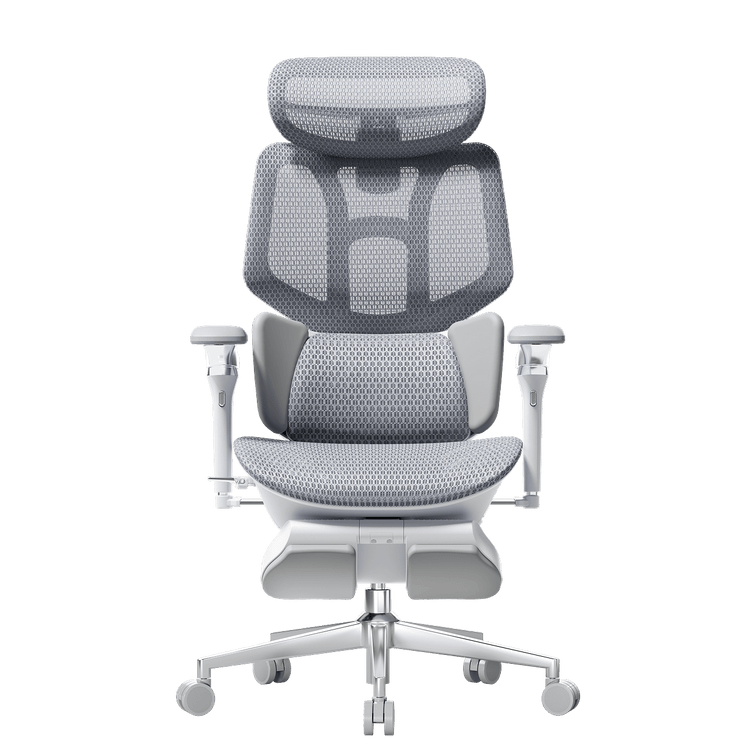
HBADA E3 Pro Ergonomic Office Chair 2026 Edition

HBADA E3 Air Ergonomic Office Chair 2026 Edition
Remove this item from your cart?
Cart
Everything owners need to know — from step‑by‑step adjustment guides to ergonomic tips that help you sit better, feel less pain, and extend the life of your chair.
All setup resources, including step-by-step assembly videos and downloadable PDF manuals for every series (E3, X7, P2, etc.), are available on our official HBADA User Manual & Assembly Guide page.
We recommend watching the video before assembly to ensure all mechanical components are correctly aligned.
The "90-90-90" rule is the gold standard for healthy sitting.
It ensures your body maintains neutral alignment to minimize muscle fatigue:
Elbows: Bent at a 90° angle, supported by armrests so shoulders stay relaxed.
Hips: Your torso and thighs should form a 90° angle, with your back firmly against the lumbar support.
Knees: Your knees should be at a 90° angle, with feet resting flat on the floor or a footrest.
A dynamic backrest (like the HBADA 3-Zone Dynamic Lumbar) is superior because it promotes active sitting.
Movement Support: It follows your micro-movements as you shift positions, providing constant support.
Reduced Compression: Studies show that dynamic movement reduces spinal disc compression compared to a fixed, static backrest.
Fatigue Prevention: It prevents muscles from becoming "locked" in one position, which improves circulation and reduces end-of-day stiffness.
A dynamic backrest (like the HBADA 3-Zone Dynamic Lumbar) is superior because it promotes active sitting.
Movement Support: It follows your micro-movements as you shift positions, providing constant support.
Reduced Compression: Studies show that dynamic movement reduces spinal disc compression compared to a fixed, static backrest.
Fatigue Prevention: It prevents muscles from becoming "locked" in one position, which improves circulation and reduces end-of-day stiffness.
Your chair height should be determined by your seated elbow height, not just the desk:
1. Adjust your chair so your elbows are at a 90° angle when your hands are on the keyboard.
2. If your feet don't reach the floor at this height, you must use a footrest to maintain the "90-90-90" rule.
3. Pro Tip: For "Petite" users, look for chairs like the E3 Air which offer lower minimum seat heights to accommodate standard U.S. desk heights.
For long-duration productivity (8h+), an ergonomic chair is almost always superior.
Breathability: Ergonomic chairs use mesh (like CloudMesh™) which prevents heat buildup better than the PU leather typically found on gaming chairs.
Posture vs. Immersion: Gaming chairs use a "bucket seat" to wrap around you for immersion; ergonomic chairs are designed to support your spine’s natural movement, reducing long-term back strain.
HBADA is committed to Sincere Craftsmanship and sustainability.
Our 2026 series utilizes:Recyclable Polymers: High-strength, recyclable nylon and plastics for frames.
Eco-Friendly Mesh: Oeko-Tex certified fabrics that are free from harmful chemicals.
Durability-First Design: By testing for 120,000+ fatigue cycles (exceeding BIFMA), we reduce environmental waste.
While scoliosis is a spinal condition, the abnormal curvature can compress the Digestive System (esophagus and stomach) and, in severe cases, limit the space for Heart and Lung function.
Proper ergonomic support helps manage posture to mitigate secondary discomfort like acid reflux (GERD) caused by organ compression.
Chiropractors recommend chairs that prioritize Adjustable Lumbar Support and Dynamic Tilt.
They specifically look for:Adjustability: The ability to tailor the chair to the user’s specific height and frame.
Pelvic Stabilization: Chairs that keep the pelvis neutral to avoid "slumping."
HBADA’s E3 Pro 2026 Edition is designed with these exact chiropractic principles—focusing on responsive lumbar tracking, 4D headrest support and 720° Adjustable armrest to relieve cervical and lumbar tension.
Yes, safety is our highest engineering priority.
All HBADA office chairs utilize heavy-duty, explosion-proof Class 3 or Class 4 pneumatic gas lift cylinders that have undergone rigorous safety testing.
Our cylinders are independently verified and certified by global standards agencies, including SGS and BIFMA, guaranteeing seamless height adjustments and extreme structural weight-load capacity over years of daily operation.
Maintaining HBADA high-elasticity mesh is simple.
For routine dust removal, use a standard vacuum cleaner with a soft brush attachment on low suction.
For localized stains or spills, gently blot the mesh surface using a microfiber cloth dampened with lukewarm water and a drop of mild, pH-neutral detergent.
Avoid harsh abrasive cleaners or heat guns, as excess heat can compromise the structural integrity of the woven fibers.
Mesh quality varies enormously. Low-density mesh feels fine initially but loses tension within months, providing progressively less support. Look for high-elasticity or high-tensile mesh with a specified weave density. A good mesh should feel supportive but give slightly under pressure — not collapse.
Soft, deep-sinking cushions feel comfortable for twenty minutes and become a problem over eight hours — they tilt your pelvis backward and flatten your lumbar curve. Medium-firm cushions maintain your spine's natural position throughout a session. Virgin-grade foam holds its shape longer than recycled foam.
Yes! Ordinary chairs force you to slouch, putting immense pressure on your lower spine. Hbada chairs feature an advanced 3-Zone Dynamic Lumbar Support (and AI-tracking in our premium models) that actively pushes into the curve of your back. This keeps your spine in a healthy "S-curve," significantly relieving lower back pain during long work or gaming sessions.
Absolutely. Our chairs are highly adjustable to fit users generally ranging from 5'3" to 6'3" (160cm - 190cm). The key is the adjustable seat depth—you can slide the seat cushion forward or backward so your thighs are fully supported without cutting off circulation at the knees. The heavy-duty Class-4 gas lift also ensures smooth height adjustments.
No. Cheap $80 chairs use low-density foam that flattens quickly. HBADA uses high-resilience Cloud-Ventilated cushions and premium breathable mesh that distribute your weight evenly. They are strictly tested and rated for 24 hours of continuous daily sitting without losing their shape or support.
A cheap chair is a "task chair" meant for 2 hours of use. A HBADA chair is a certified ergonomic health tool designed for your spine. Instead of spending over $1,500 on brands like Herman Miller, you get the same premium features—breathable mesh, SGS-certified safety cylinders, and precise posture correction—at a fraction of the price. Think of it as an investment in your health and productivity.
Not at all! Assembly typically takes less than 20 minutes. The instructions are incredibly visual and easy to follow, and we include all the necessary tools (like the hex key and bolts) right in the box. You won't need your own toolbox.
There is no single ideal budget for every user. If you sit for a full workday, prioritize adjustable seat height and depth, lumbar support, armrests, recline control, verified weight capacity, warranty coverage and a practical return policy before paying for appearance or extra features.
Look for adjustable seat height, usable lumbar support, a supportive seat, adjustable armrests, recline tension and a stable five-star base. Also check the chair’s dimensions, weight capacity, replacement-part availability, warranty and return costs, because a lower purchase price does not always mean a lower long-term cost.
Neither seat type is best for everyone. Mesh provides greater airflow and maintains a firmer suspended feel, while a cushioned seat feels softer initially and may suit users who prefer more padding. Compare the seat frame, pressure distribution, firmness and fit—not only the material.
A small home office usually benefits from a chair with a compact base, moderate seat width and armrests that can be lowered or flipped up. Measure the desk opening, floor space and distance behind the chair before buying, including the additional clearance needed when reclining.
Flip-up armrests are useful when a chair needs to slide completely under a desk or be stored in a narrow area. However, some flip-up designs offer fewer height, depth or angle adjustments than multi-directional armrests, so compare space-saving benefits with the support needed for daily work.
Soft polyurethane or rubber-style casters are generally better for hardwood floors because they roll more quietly and are less likely to leave scratches than hard plastic wheels. Confirm the caster material and stem size before replacing the wheels, and keep the floor free from grit that could become trapped under them.
Larger, firmer casters usually move more easily across carpet than small soft wheels. Thick or high-pile carpet may also require a suitable chair mat to reduce rolling resistance and protect the flooring. Always confirm that replacement casters fit the chair’s base and stem connection.
A chair mat is not required in every workspace. It can protect soft flooring, reduce caster resistance on carpet and prevent repeated wear in one area. Choose a mat designed for the specific floor type, because carpet mats and hard-floor mats use different surfaces and backing materials.
Armrests are useful when they support the forearms without raising the shoulders or preventing the chair from approaching the desk. Adjustable armrests provide the greatest flexibility. If the armrests interfere with the desk or force the arms into an uncomfortable position, flip-up or removable designs may be more practical.
Cross-legged sitting is easier on a chair with a wide, relatively flat seat and enough space between the armrests. Check the usable seat width rather than the chair’s total width. Change positions regularly instead of relying on one posture for the entire workday.
A task chair is typically compact and designed for focused desk work. An ergonomic office chair emphasizes adjustable fit and support for longer sitting periods, while an executive chair is usually larger and may prioritize upholstery, appearance and a high back. Actual adjustability matters more than the category name.
Forward seat tilt angles the front of the seat slightly downward. It may help users move closer to a desk during typing, writing or other forward-focused tasks. The feature should be adjustable or lockable so users can return to a level or reclined position when needed.
A standard recline mainly changes the backrest angle. A synchro-tilt mechanism moves the backrest and seat in a coordinated ratio, allowing the body to open naturally while the feet remain more stable. Compare the available lock positions, tension control and maximum recline angle before choosing.
The seat should be wide enough to allow comfortable movement without pressure from the armrests. Its depth should support most of the thighs while leaving a small gap between the seat edge and the back of the knees. Adjustable seat depth is especially useful for shorter or taller users.
Required space depends on the chair’s backrest angle, seat movement and footrest design. Measure from the front of the desk to the nearest wall with the chair fully reclined, not only when it is upright. Remember to include space for the user’s legs and an extended footrest.
Office chair parts are not always universal. Casters, gas lifts, arm pads and mechanisms can use different stem sizes, mounting holes, lengths and weight ratings. Check the chair model and part specifications or contact the manufacturer before ordering a replacement.
A waterfall seat edge curves downward at the front of the seat instead of ending in a hard horizontal edge. This shape reduces direct contact between the seat frame and the back of the knees. Proper seat depth and height remain necessary for the edge design to work comfortably.
The best home-office chair fits the user, desk, room and daily sitting time. Prioritize seat-height range, seat depth, lumbar adjustment, armrest clearance, material, recline, weight capacity and warranty. A highly adjustable chair is usually more versatile when several people share the same workspace.
The HBADA E3 Pro and Herman Miller Aeron are designed for different buying priorities.
The HBADA E3 Pro 2026 features an adjustable mesh seat and back, an included adjustable headrest, three-zone lumbar support, and an optional footrest configuration. HBADA specifies the E3 Pro 2026 for users from 5'1" to 6'5" and up to 330 lb.
The Aeron is worth considering if multiple chair sizes, an established commercial seating platform, and longer warranty coverage are priorities. The E3 Pro is worth considering if you want an integrated headrest, multi-directional lumbar adjustment, deeper recline, or an optional footrest.
Compare the HBADA E3 Pro 2026 specifications with the official Herman Miller Aeron specifications.
Comparison information was reviewed on July 20, 2026, using publicly available manufacturer information. Product specifications, availability, prices, warranties, and return terms can change.
Herman Miller, Aeron, Steelcase, Leap, Branch, Sihoo, Doro, Secretlab, and TITAN are trademarks of their respective owners. HBADA is not affiliated with, sponsored by, or endorsed by the companies identified in this comparison.
The main differences between the HBADA E3 Pro and Steelcase Leap are the seating material, head-and-leg support options, stated weight capacity, and warranty structure.
HBADA lists the E3 Pro 2026 with a mesh seat and back, an adjustable headrest, three-zone lumbar support, an optional footrest configuration, support up to 330 lb, and five-year coverage for specified core load-bearing components.
Choose based on seat material, body-size compatibility, adjustment ranges, warranty terms, and whether an integrated headrest or footrest is important to your setup.
Compare the HBADA E3 Pro 2026, HBADA warranty terms, and the official Steelcase Leap specifications.
Comparison information was reviewed on July 20, 2026, using publicly available manufacturer information. Product specifications, availability, prices, warranties, and return terms can change.
Herman Miller, Aeron, Steelcase, Leap, Branch, Sihoo, Doro, Secretlab, and TITAN are trademarks of their respective owners. HBADA is not affiliated with, sponsored by, or endorsed by the companies identified in this comparison.
Both chairs offer adjustable seat depth, lumbar support, armrests, recline controls, and head-support options, but the adjustment systems are designed differently.
HBADA lists three-zone lumbar adjustment, multi-directional armrests, an included adjustable headrest, adjustable seat depth, support up to 330 lb, and an optional footrest configuration.
Adjustment counts are not directly comparable because manufacturers define and count movement directions differently. Compare the actual adjustment ranges and controls that match your body, desk height, and working posture instead of choosing only by the largest adjustment number.
See the HBADA E3 Pro specifications and the official Branch Ergonomic Chair Pro specifications.
Comparison information was reviewed on July 20, 2026, using publicly available manufacturer information. Product specifications, availability, prices, warranties, and return terms can change.
Herman Miller, Aeron, Steelcase, Leap, Branch, Sihoo, Doro, Secretlab, and TITAN are trademarks of their respective owners. HBADA is not affiliated with, sponsored by, or endorsed by the companies identified in this comparison.
Compare ergonomic office chairs using seven factors: seat dimensions, lumbar-support type, armrest movement, headrest adjustment, recline controls, stated weight capacity, and written warranty coverage.
Price is useful for setting a budget, but it does not determine fit. Start by eliminating chairs that cannot match your body measurements or desk, then compare the adjustments and support features you will use during a normal workday. See the ergonomic office chair collection for current models.
Check the minimum and maximum seat height, usable seat depth, seat width, armrest height, backrest height, lumbar adjustment range, and clearance beneath your desk.
A properly fitted chair should allow your feet to rest on the floor or a footrest, leave space behind the knees, support the lower back, and keep the shoulders relaxed while working. Use the office chair fit guide before comparing models.
These labels describe the number of movement directions offered by a chair component, but there is no universal cross-brand counting standard.
One manufacturer may count height, depth, width, rotation, and tilt as separate directions, while another may group several movements together. Compare the actual movement axes and adjustment ranges instead of assuming that the largest “D” number automatically provides the best fit.
Fixed lumbar support remains in one position. Manual lumbar support allows the user to change its height, depth, or pressure. Mechanically adaptive lumbar support responds to body position without electrical power. Smart lumbar support uses sensors, motors, or programmed controls to adjust support.
No lumbar-support category fits every person. Position, pressure, seat depth, backrest shape, and individual body proportions all affect comfort. Choose the system that gives you the amount of control you prefer without creating unwanted pressure.
Neither material is automatically better for every user. Mesh emphasizes airflow and flexible support, while padded seats provide a different pressure distribution and surface feel.
For long workdays, compare seat shape, edge pressure, material tension, cushioning density, room temperature, and your preferred sitting position. Material alone cannot predict comfort.
A headrest is most useful for users who recline, take short breaks in the chair, or want neck and head contact in supported positions. It is less important for users who work upright without leaning back.
An adjustable headrest should meet the head or upper neck without pushing the head forward. Compare headrest height, angle, depth, and removal options before choosing a chair.
Measure the height and width of the open space beneath your desk, then compare those measurements with the chair’s armrest range and seat height.
Also check for drawers, support beams, keyboard trays, and desktop thickness. If the armrests cannot move low enough, the chair may prevent you from reaching the work surface while keeping your shoulders relaxed.
No. Specifications can identify dimensional compatibility and available adjustments, but they cannot predict individual comfort.
Lumbar pressure, mesh firmness, seat-edge contact, headrest position, armrest movement, and recline resistance require a real-use trial. Use specifications to create a shortlist, then test the chair during normal work while the applicable return window is open.
Review the current return policy before assembly and keep the original packaging until you decide to keep the chair.
Set the seat height first, followed by seat depth, lumbar support, armrests, headrest, and recline resistance. Change one setting at a time and test the chair during normal desk work instead of judging it only from the first few minutes. The chair adjustment guide explains the recommended adjustment order.
A headline warranty length does not explain which parts are covered. Compare coverage for the chair base, gas lift, casters, mechanism, armrests, lumbar system, backrest, upholstery or mesh, and electrical components.
Also check original-purchaser requirements, eligible sales channels, normal-wear exclusions, replacement-part availability, shipping responsibility, and commercial-use conditions. Read the current HBADA warranty policy before relying on a warranty badge or comparison table.