






The everyday durability guide
A lasting chair starts with more than a number.
Before buying an office chair, it is natural to ask: “Will this actually hold up?” The useful answer comes from understanding its components, how you use it, and what happens when a part needs attention.
Office chairs do not have one universal lifespan. Materials, construction, daily use, user load, maintenance, and access to replacement parts all affect how long a chair remains useful. Component tests help explain durability, but they do not guarantee a specific number of years. Consider repair for an isolated, serviceable problem; consider replacement when safety, fit, or several major components can no longer be restored.
How long should an office chair last?

A chair’s age tells only part of its story. A lightly used home-office chair and a shared chair used across multiple shifts can accumulate very different amounts of wear in the same calendar year.
Rather than treating a general lifespan estimate as a replacement deadline, look at whether the chair remains stable, holds its adjustments, and supports your working position. A chair may still be usable after a replaceable component wears out. Conversely, a newer chair may need attention if it develops a structural or mechanical fault.
Three different things: a warranty describes coverage under stated terms; a durability test measures performance under a defined procedure; service life describes how long the chair remains usable in practice. These are not interchangeable.
Before buying, review the model’s specifications and HBADA warranty and service information . Check which components are covered and what support is available if a part needs replacing.
Why test cycles cannot simply become hours of use
Durability testing can repeat a defined action, such as rotating a seat or operating a reclining mechanism, under controlled conditions. The resulting cycle count describes that test—not a complete record of everyday ownership.
One person may recline frequently, while another stays mostly upright. Loads, movement patterns, cleaning habits, and the surrounding environment also differ. There is no universal conversion from a component cycle count to “hours of sitting” or “years before replacement.”
About a “1,000-hour test”: an actual time-based test needs a documented method and recorded observations. Component cycle counts alone cannot establish that a chair has completed 1,000 hours of real-world testing.
Use laboratory figures as one part of your assessment, alongside fit, serviceability, warranty terms, and the information available about the test itself.
What affects ergonomic office chair lifespan?
Durability is not just about the seat surface. A chair is a system of moving and load-bearing parts, and the condition of each one matters.
Construction and components
The base, frame, lift, reclining mechanism, and attachment points all contribute to how the chair handles everyday use. Check the specifications of the exact model rather than relying on appearance alone.
Seat and back materials
Mesh, fabric, foam, and other upholstery materials wear differently. Check for changes in support, tension, seams, and attachment points—not just cosmetic marks.
How the chair is used
Shared use, frequent adjustments, repeated reclining, and loads outside the stated limits can change the demands placed on a chair.
Care and repair options
Appropriate cleaning and timely attention to loose or worn parts help maintain usability. Available, compatible replacement parts can also make repair more practical.
What office chair durability tests actually tell you

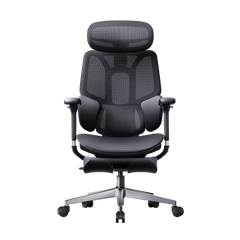
For a concrete example, the HBADA X7 product page lists the following component test figures.
| Component test | Reported cycles | What the number refers to |
|---|---|---|
| Armrests | 600,000 | The reported armrest test, not the whole chair’s lifespan. |
| Gas lift | 120,000 | The reported lift test, not mesh durability. |
| Rotation | 120,000 | The reported rotation test, not hours of sitting. |
| Recline | 100,000 | The reported reclining test, not guaranteed years of use. |
Source: HBADA’s X7 product page. These are manufacturer-reported figures, not results from an independent test conducted for this article. They should not be transferred to other models.
Look beyond the headline cycle count
When comparing test claims, ask which part was tested, what load was applied, how the movement was defined, and what counted as passing. Two large numbers are not necessarily comparable if the test procedures differ.
If a listing mentions a testing standard or certification, look for documentation that identifies the exact model and scope. A brief product-page statement is not a substitute for a full test report.
Signs of office chair wear and tear to watch for

Pay attention to changes in how the chair behaves. Surface wear may be cosmetic; instability or a mechanism that no longer holds its position deserves closer attention.
- The seat no longer holds its height. Check with support whether the lift or another component needs service.
- The chair feels unstable. New wobbling, a damaged base, or visible cracks should be assessed before continued use.
- The seat or back has lost support. Look for persistent sagging, damaged seams, or attachment points pulling away.
- An adjustment no longer stays in place. A slipping backrest or failed locking mechanism can change your sitting position unexpectedly.
- Several faults are developing together. Consider the condition of the whole chair instead of evaluating each repair in isolation.
Do not judge a problem by sound alone. A squeak may have a straightforward cause, but a new noise accompanied by looseness, cracks, or unexpected movement needs investigation. Stop using a chair that appears structurally unsafe.
New discomfort is also a reason to reassess your chair settings and workstation. It does not, by itself, prove that the chair is worn out or identify a medical cause.
When should you repair or replace an office chair?
Start with the fault, not the chair’s birthday. An isolated problem may be repairable if the rest of the chair is sound and an approved replacement part is available.
| Situation | Suggested next step |
|---|---|
| One worn, replaceable component | Ask about compatible parts, warranty coverage, and the recommended repair procedure. |
| Loose fasteners without visible damage | Follow the assembly instructions or ask support how to inspect and secure the connection. |
| Cracked or damaged load-bearing structure | Stop using the chair and seek assessment. Do not attempt an improvised structural repair. |
| Several major parts need replacement | Compare the complete repair cost, parts availability, and remaining condition with replacement. |
| The chair no longer fits your needs | Recheck adjustments first. Consider a different chair if its adjustment range cannot provide a suitable fit. |
What about a chair that keeps sinking?
A sinking seat can indicate a problem with the gas lift, but the cause and compatible replacement should be confirmed with the manufacturer. Ask for a repair quote before assuming the entire chair must be replaced.
Do not open, drill, heat, or modify a gas cylinder. Use manufacturer-approved service guidance and seek professional help when necessary.
Keep your order details, model information, and clear photos of the issue ready when reviewing HBADA’s service options .
How to help your office chair last longer
Good care does not make a chair indestructible, but it can help you identify problems early and avoid preventable damage.
- Follow the care instructions for your model. Use cleaning methods suited to its materials. Avoid applying a leather treatment or strong cleaning product to a surface it is not intended for.
- Keep casters clear. Remove accessible hair and debris as directed, and check that the wheels remain securely attached.
- Check connections when something changes. Investigate new looseness or movement. Tighten fasteners only as instructed; overtightening can cause damage.
- Stay within the stated operating limits. Follow the chair’s load and use instructions. Do not stand on the seat or force an adjustment past its stop.
- Address small faults before they spread. Contact support when a mechanism stops working normally rather than compensating with an awkward sitting position.
- Keep service information accessible. Save the manual and purchase details so that checking coverage or identifying a replacement part is easier.
Office chair lifespan FAQs
Should I replace my office chair after five years?
Not automatically. Assess its stability, adjustment mechanisms, seat support, and suitability for your workstation. Age alone is not a reliable replacement rule.
Do higher test-cycle numbers mean a chair lasts longer?
They can provide useful information about a tested component, but only in the context of the procedure, load, and pass criteria. They do not establish a universal lifespan or make different test methods directly comparable.
Does a long warranty guarantee the same service life?
No. Warranty coverage depends on its terms, exclusions, and covered components. It is different from a prediction of how long a chair will remain comfortable and functional in your particular setting.
Can a sinking office chair be repaired?
It may be repairable if the cause is identified and a compatible replacement component is available. Contact the manufacturer for guidance. Do not dismantle or modify the gas cylinder itself.
Does mesh always wear out before a padded seat?
Material type alone cannot answer that question. Construction, material quality, loading, and care all matter. Inspect mesh for loss of tension or attachment damage and padded seats for lasting compression or other changes in support.
What should I check before buying a durable office chair?
Check fit and adjustment range, load limits, model-specific test information, warranty terms, and access to service or replacement parts. Durability is most useful when the chair also fits the person and workspace.
Buy for support, serviceability, and everyday use
The most useful durability question is not simply “How many years will it last?” It is “What evidence is available, does this chair fit my needs, and can I get help if something wears out?”
Read component figures in context, keep up with appropriate care, and assess faults early. That gives you a more practical basis for choosing and maintaining a chair than an unsupported lifespan promise.
Look at the details behind your next chair.
Review the HBADA X7’s product specifications, adjustment features, and published component test information. Check the selected configuration and service terms before making your decision.
Explore the HBADA X7